
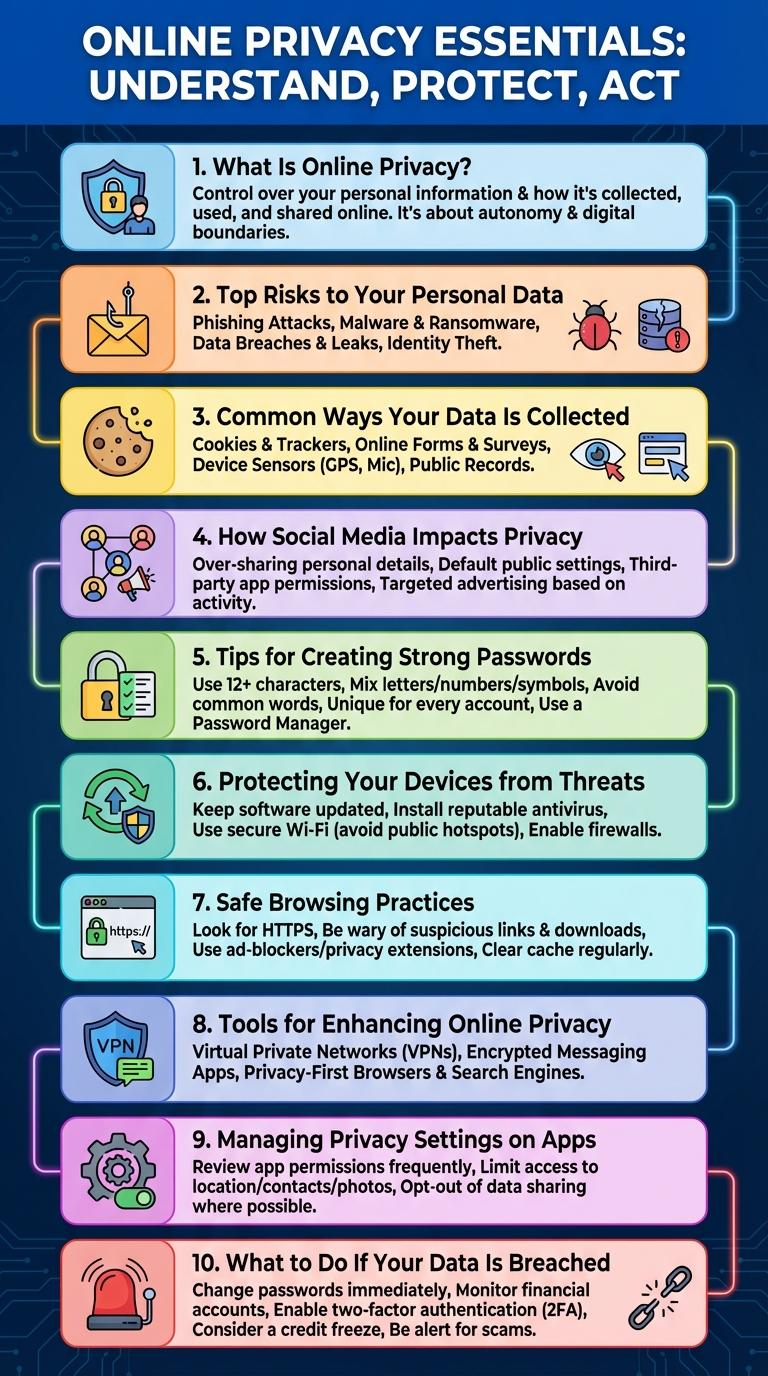
Online privacy remains a critical concern as digital footprints expand across various platforms and devices. Protecting personal data requires understanding key risks and adopting safe browsing practices. This infographic highlights essential facts and practical tips to help users safeguard their information in the digital age.
What Is Online Privacy?
Online privacy refers to the protection of personal data and information shared on the internet. It involves controlling who can access, use, and share your digital footprint.
Maintaining online privacy helps prevent identity theft, unauthorized tracking, and data breaches. Users achieve this through secure passwords, encryption, and privacy settings on social platforms.
Top Risks to Your Personal Data
Online privacy is increasingly vulnerable due to widespread data collection and cyber threats. Protecting personal information requires awareness of common risks associated with digital activities.
- Data Breaches - Unauthorized access to databases exposes sensitive personal information to hackers.
- Phishing Attacks - Fraudulent emails and websites trick users into revealing private data.
- Tracking Cookies - Websites use cookies to monitor browsing behavior and collect personal information without explicit consent.
Understanding these risks helps users adopt stronger security practices to safeguard their online privacy.
Common Ways Your Data Is Collected
Online privacy is constantly at risk due to numerous data collection methods used by websites and apps. Understanding how your information is gathered helps you protect your personal data effectively.
Common data collection techniques include tracking cookies, which monitor browsing habits across multiple sites. Social media platforms collect information through user interactions and shared content. Mobile apps access location data and device information to personalize services and advertisements.
How Social Media Impacts Privacy
Social media platforms collect vast amounts of personal data, including location, interests, and interactions. This data is often used for targeted advertising and can expose users to privacy risks.
Users may unknowingly share sensitive information through posts, photos, and check-ins. Privacy settings are crucial but often complex, making it difficult to control who accesses personal information.
Tips for Creating Strong Passwords
Creating strong passwords is essential for protecting your online privacy. Use a combination of uppercase letters, lowercase letters, numbers, and special characters to create a complex password. Avoid using easily guessable information like birthdays or common words to enhance security.
Protecting Your Devices from Threats
Protecting your devices from threats is essential for maintaining online privacy and security. Implementing strong safeguards helps prevent unauthorized access and data breaches.
- Use Strong Passwords - Create complex passwords combining letters, numbers, and symbols to secure accounts against hacking.
- Enable Two-Factor Authentication - Add an extra layer of verification to your devices, requiring both a password and a second form of identification.
- Keep Software Updated - Regularly update operating systems and applications to patch vulnerabilities and enhance security.
Safe Browsing Practices
How can you ensure safe browsing practices while online?
Use strong, unique passwords for different websites to protect your accounts from unauthorized access. Enable two-factor authentication whenever possible to add an extra layer of security.
What role do secure connections play in online privacy?
Always browse websites with HTTPS to encrypt data between your device and the server. Avoid using public Wi-Fi networks for sensitive transactions unless you use a trusted VPN service.
Why is it important to manage browser settings for privacy?
Regularly clear cookies and cache to remove tracking data that websites use to monitor your activity. Adjust your browser's privacy settings to limit data sharing with third parties.
How do browser extensions affect your online privacy?
Install extensions only from reputable sources to minimize the risk of malware or data leaks. Review permissions requested by each extension and disable those that require unnecessary access.
What practices help prevent phishing and malicious attacks?
Be cautious when clicking on links or downloading attachments from unknown senders to avoid phishing scams. Use up-to-date antivirus software and browser security tools to detect and block malicious content.
Tools for Enhancing Online Privacy
Online privacy tools are essential for protecting personal data from unauthorized access and surveillance. Popular tools include Virtual Private Networks (VPNs), encrypted messaging apps, and browser extensions that block trackers. Using these tools helps users maintain anonymity, secure communications, and control over their digital footprint.
Managing Privacy Settings on Apps
| Privacy Setting | Tip for Managing |
|---|---|
| App Permissions | Review and disable permissions for camera, microphone, and location that are not essential for the app's function. |
| Profile Visibility | Set profile visibility to friends only or private to limit exposure of personal data. |
| Data Sharing Preferences | Opt out of data sharing options to prevent apps from sharing information with third parties. |
| Advertising Settings | Disable personalized ads to reduce tracking based on your app activity and data. |
| Two-Factor Authentication | Enable 2FA to enhance account security and protect against unauthorized access. |