
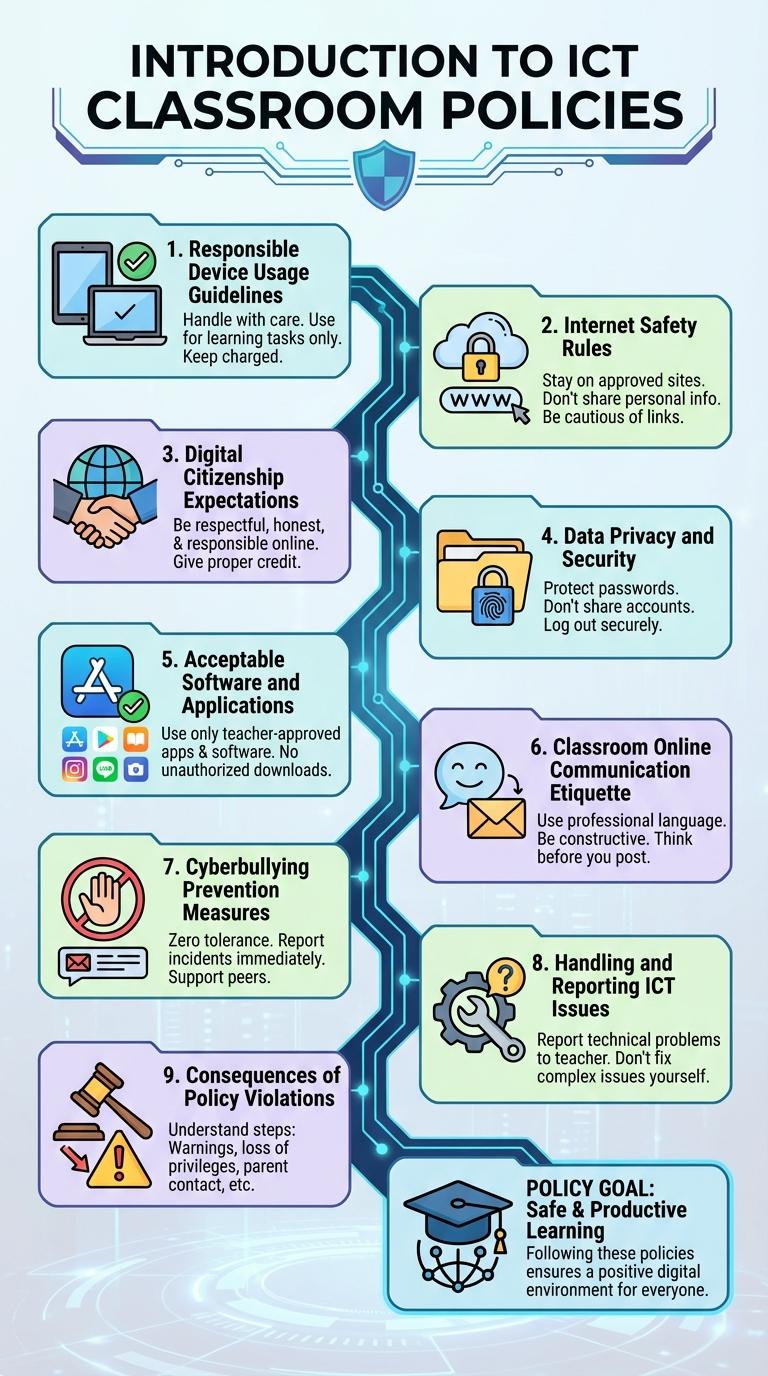
ICT classroom policies ensure a structured and efficient learning environment by outlining acceptable technology use and promoting digital responsibility. Clear guidelines help prevent disruptions, safeguard student data, and foster respectful online behavior. Implementing these policies enhances student engagement and supports effective integration of digital tools in education.
Introduction to ICT Classroom Policies
ICT classroom policies establish guidelines to ensure effective and responsible use of technology during lessons. These policies promote a structured learning environment that leverages digital tools while minimizing distractions and risks.
Clear rules on device usage, internet access, and digital conduct help maintain focus and protect students' privacy. Implementing these policies supports educational goals and encourages positive digital citizenship.
Responsible Device Usage Guidelines
Responsible Device Usage Guidelines in ICT classrooms ensure students use technology ethically and safely. Students must handle devices carefully, avoid accessing inappropriate content, and respect privacy and data security rules. These policies promote a productive learning environment while protecting digital resources and personal information.
Internet Safety Rules
Internet safety rules are essential in ICT classrooms to protect students from online threats. Implementing clear policies helps maintain a secure and productive learning environment.
Students must avoid sharing personal information and use strong passwords to safeguard their accounts. Educators should monitor internet usage and provide guidance on recognizing cyberbullying and phishing attempts.
Digital Citizenship Expectations
Digital Citizenship Expectations in ICT classrooms promote responsible and ethical use of technology. Students are encouraged to respect digital privacy, avoid plagiarism, and engage in positive online communication. These guidelines foster a safe and productive learning environment for all participants.
Data Privacy and Security
Data privacy and security in ICT classrooms are essential for protecting student information and maintaining a safe learning environment. Implementing clear policies helps prevent unauthorized access and data breaches.
- Student Data Protection - Ensure all student data is stored securely and access is limited to authorized personnel only.
- Secure Password Practices - Require strong passwords and regular updates to protect accounts from unauthorized use.
- Device Usage Monitoring - Monitor and restrict device usage to prevent exposure to malware and unauthorized software installations.
Acceptable Software and Applications
ICT classroom policies ensure the use of approved software and applications to maintain a secure and productive learning environment. Clear guidelines help students and staff access only tools that support educational goals and protect data integrity.
- Approved Software List - Only software vetted by the school IT department is allowed to be installed or used during class.
- Educational Purpose - Applications must directly support curriculum objectives or improve digital literacy.
- Security Compliance - Software must comply with data protection standards and not expose the network to vulnerabilities.
Following these policies helps maintain a safe ICT environment conducive to effective teaching and learning.
Classroom Online Communication Etiquette
Effective ICT classroom policies enhance respectful and productive online communication. Clear etiquette guidelines support a positive digital learning environment.
Classroom Online Communication Etiquette focuses on respectful interaction, clarity, and appropriate behavior in virtual settings.
- Use respectful language - Communicate with politeness and avoid offensive or inappropriate remarks.
- Stay on topic - Keep messages relevant to the class discussion to maintain focus and clarity.
- Respect privacy - Do not share personal or sensitive information without consent.
Cyberbullying Prevention Measures
| Policy Aspect | Cyberbullying Prevention Measures |
|---|---|
| Awareness Programs | Implement regular student workshops focusing on recognizing and preventing cyberbullying. |
| Reporting Mechanisms | Establish secure and anonymous reporting channels for students to report cyberbullying incidents. |
| Code of Conduct | Enforce clear rules outlining unacceptable online behaviors with specific consequences for cyberbullying. |
| Parental Involvement | Encourage parents to participate in informational sessions on identifying cyberbullying signs and support strategies. |
| Monitoring Tools | Utilize software to monitor ICT platforms for harmful language and intervene promptly when cyberbullying occurs. |
Handling and Reporting ICT Issues
How should students handle ICT issues in the classroom? Students must immediately notify the teacher if any ICT equipment malfunctions or behaves unusually. Prompt reporting helps prevent further damage and ensures quick resolution.
What is the correct procedure for reporting ICT problems? Report the problem by providing a clear description of the issue and any error messages to the designated ICT support team. Accurate information speeds up troubleshooting and repair processes.
Who is responsible for managing ICT equipment in the classroom? Teachers oversee daily use and are the first point of contact for any technical difficulties. They coordinate with ICT staff to address and resolve issues efficiently.
What actions should be avoided when an ICT issue occurs? Students should not attempt to fix hardware or software problems themselves to prevent accidental damage. Unauthorized repairs can void warranties and complicate technical support.
Why is it important to follow ICT classroom policies on issue handling? Following established protocols ensures minimal disruption to learning activities and maintains the integrity of ICT resources. Proper handling extends the lifespan of classroom technology.