
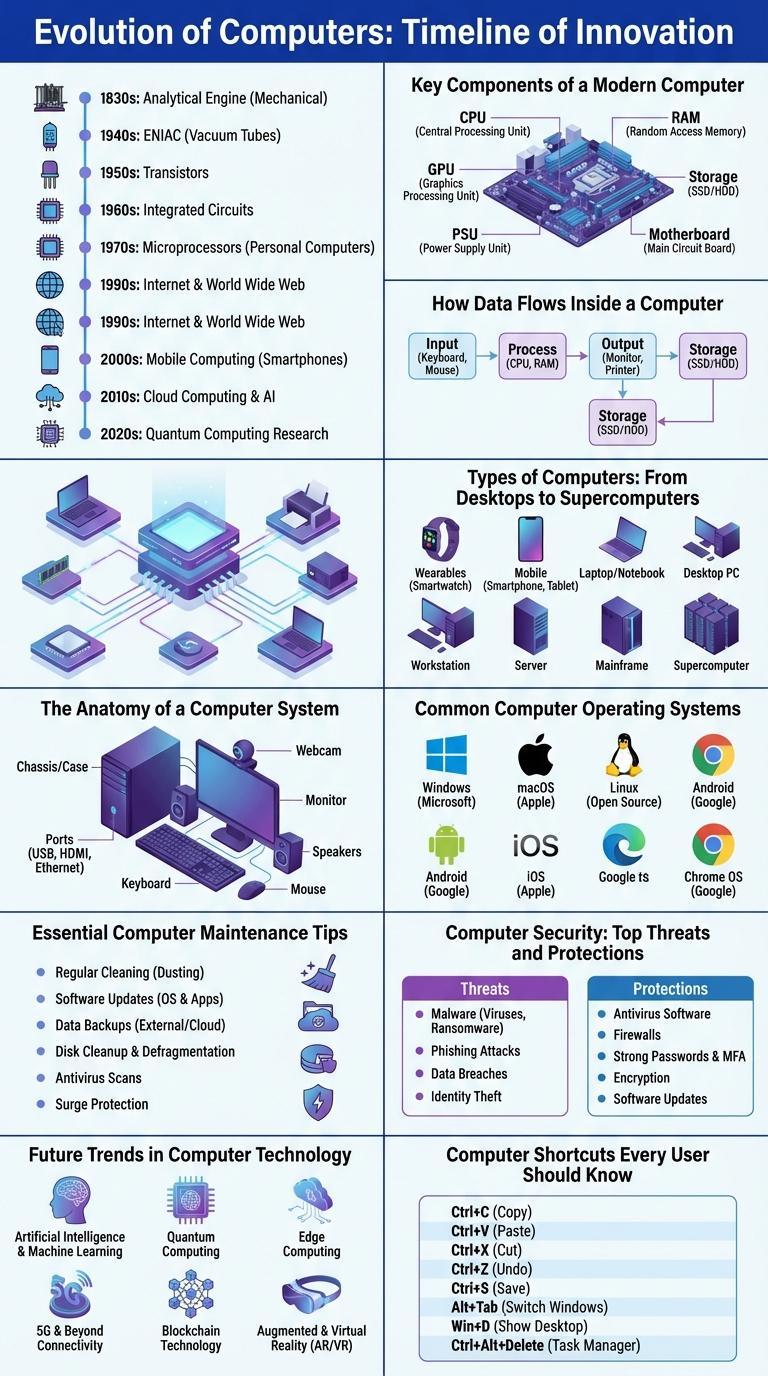
Computers have revolutionized the way we work, communicate, and access information, making understanding their components and functions essential. Infographics visually break down complex computer concepts into easy-to-understand elements, highlighting hardware, software, and data processing. This clear representation helps users grasp the intricate processes behind everyday computing technology.
Evolution of Computers: Timeline of Innovation
The evolution of computers spans from early mechanical devices to today's advanced quantum machines. Key innovations include the invention of the transistor, the development of integrated circuits, and the rise of personal computing. This timeline highlights major milestones shaping modern technology and digital transformation.
Key Components of a Modern Computer
Modern computers consist of several essential components that work together to perform complex tasks. These key parts include the Central Processing Unit (CPU), memory, storage devices, input/output peripherals, and the motherboard.
The CPU acts as the brain of the computer, processing instructions and managing operations. Memory, such as RAM, temporarily stores data for quick access, while storage devices like SSDs retain information long-term.
How Data Flows Inside a Computer
Data flow inside a computer is a continuous process involving various components working together. Understanding this flow is essential to grasp how computers execute commands efficiently.
- Input Devices - Devices like keyboards and mice send data to the computer for processing.
- Central Processing Unit (CPU) - The CPU interprets and processes instructions received from input devices and memory.
- Memory Units - RAM temporarily stores data and instructions that the CPU needs during operation.
- Data Bus - The data bus transfers information between the CPU, memory, and input/output devices.
- Output Devices - Processed data is sent to output devices such as monitors and printers to present the results.
Efficient data flow inside a computer ensures quick processing and accurate output of information.
Types of Computers: From Desktops to Supercomputers
Computers come in various types, each designed to meet specific needs. These range from everyday desktops to powerful supercomputers used for complex calculations.
Desktops offer versatility for personal and professional use, featuring components like monitors, CPUs, and peripherals. Laptops provide portable computing power without sacrificing performance.
Tablets and smartphones represent ultra-portable computers with touch interfaces and wireless connectivity. Servers manage network resources and data storage for multiple users.
Supercomputers perform at exceptionally high speeds, enabling advanced scientific research and large-scale simulations. They consist of thousands of processors working in parallel to solve intricate problems.
The Anatomy of a Computer System
| Component | Description |
|---|---|
| Central Processing Unit (CPU) | The brain of the computer executing instructions and processing data. |
| Memory (RAM) | Temporary storage for active programs and data that the CPU uses in real-time. |
| Storage Device | Permanent data storage, includes SSDs and HDDs for saving files and applications. |
| Input Devices | Hardware like keyboard and mouse used to enter data and commands. |
| Output Devices | Hardware such as monitors and printers used to display or produce information. |
Common Computer Operating Systems
Computer operating systems manage hardware and software resources on devices. They provide essential services for computer programs and user interaction.
Common operating systems vary by device type and user needs, influencing functionality and software compatibility.
- Windows - Widely used for personal and business computers, known for its user-friendly interface and extensive software support.
- macOS - Apple's operating system designed for Mac computers, offers seamless integration with Apple hardware and software.
- Linux - An open-source OS popular among developers and servers, known for customization and security features.
Essential Computer Maintenance Tips
How can regular computer maintenance improve performance? Keeping your computer clean from dust and debris prevents overheating and hardware damage. Regularly updating software enhances security and ensures smooth operation.
What are key hardware checks for computer maintenance? Inspect cables and connections for wear and secure fit to avoid malfunctions. Monitor hard drive health to prevent data loss and system crashes.
Why is software maintenance important for computers? Running antivirus scans detects and removes harmful malware that can compromise data. Cleaning up temporary files frees storage space and speeds up processing.
How often should disk cleanup and defragmentation be performed? Monthly disk cleanup removes unnecessary files that slow down the system. Defragmenting hard drives optimizes data access speed and overall efficiency.
What role does backup play in computer maintenance? Regular data backups protect important files from accidental deletion or hardware failure. Using both cloud and physical backup methods ensures data redundancy.
Computer Security: Top Threats and Protections
Computer security is essential to protect sensitive data from cyber threats. Understanding top threats helps in implementing effective protections.
Common threats include malware, phishing attacks, ransomware, unauthorized access, and data breaches. Protections involve using strong passwords, updated antivirus software, firewalls, and regular software updates. Educating users on safe online practices also strengthens overall security.
Future Trends in Computer Technology
Future trends in computer technology are driven by advancements in artificial intelligence, quantum computing, and edge computing. These innovations promise faster data processing, enhanced machine learning capabilities, and improved cybersecurity measures. The integration of these technologies will revolutionize industries, enabling more efficient automation and smarter decision-making systems.