
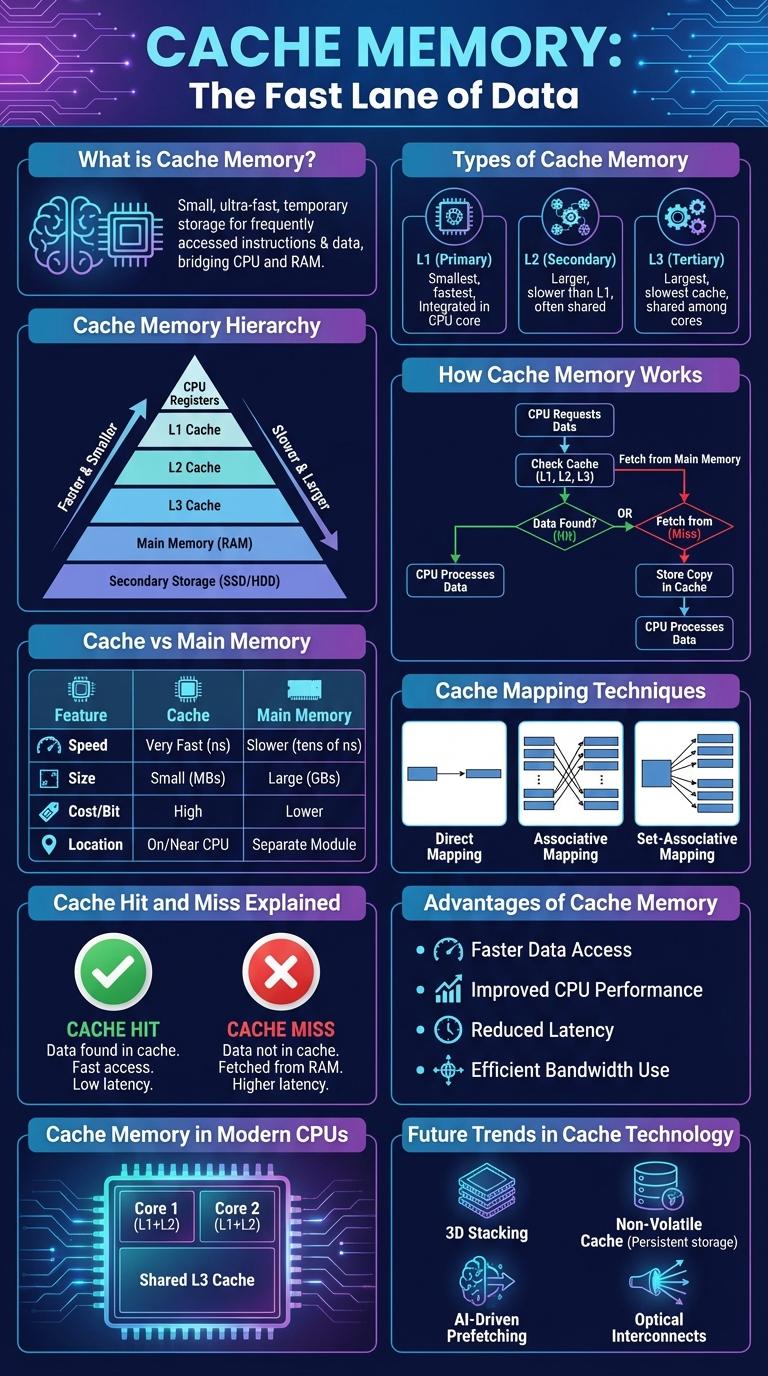
Cache memory is a high-speed storage component that temporarily holds frequently accessed data to speed up processing and improve overall system performance. It reduces the time a processor takes to retrieve data from the main memory by storing copies of critical information closer to the CPU. This infographic visually explains the structure, types, and benefits of cache memory in computing systems.
What is Cache Memory?
Cache memory is a small, high-speed storage located close to the CPU. It stores frequently accessed data and instructions to speed up processing.
Cache reduces the time needed to access data from the main memory (RAM). This improves overall system performance and efficiency.
Types of Cache Memory
Cache memory is a small, high-speed storage located close to the CPU, designed to temporarily hold frequently accessed data and instructions. This reduces the time the processor needs to fetch data from the main memory, enhancing overall system performance.
There are three primary types of cache memory: L1, L2, and L3. Each type differs in size, speed, and proximity to the CPU core, impacting its performance and use case.
Cache Memory Hierarchy
Cache memory hierarchy consists of multiple levels designed to improve processing speed by storing frequently accessed data closer to the CPU. Level 1 (L1) cache is the smallest and fastest, located inside the CPU core, followed by Level 2 (L2) cache which is larger but slightly slower. Level 3 (L3) cache is shared among cores, larger in size, and acts as a buffer between the processor cores and main memory.
How Cache Memory Works
Cache memory is a small, high-speed storage located close to the CPU to temporarily hold frequently accessed data and instructions. It reduces the time the processor takes to access data from the main memory.
When the CPU needs data, it first checks the cache. If the data is found (cache hit), it is quickly retrieved; if not (cache miss), the data is fetched from the main memory and stored in the cache for future access. This process improves overall system performance by minimizing delays. Cache memory operates through different levels--L1, L2, and L3--each with increasing size and latency.
Cache vs Main Memory
Cache memory is a small, high-speed storage located close to the CPU, designed to temporarily hold frequently accessed data. Main memory, or RAM, is larger but slower, serving as the primary workspace for active processes and data.
- Speed - Cache memory operates at much higher speeds compared to main memory, reducing CPU wait times.
- Size - Cache memory is significantly smaller in size, typically ranging from a few KB to several MB, while main memory ranges from GBs to tens of GBs.
- Proximity - Cache is physically closer to the CPU core, enabling faster data access than main memory located on the motherboard.
Cache Mapping Techniques
Cache memory improves processor speed by storing frequently accessed data. Cache mapping techniques determine how data is placed and retrieved in the cache.
- Direct Mapping - Each block of main memory maps to exactly one cache line, enabling fast access but with limited flexibility.
- Fully Associative Mapping - Any block of memory can be placed in any cache line, maximizing flexibility at the cost of complexity and search time.
- Set-Associative Mapping - Combines direct and associative methods by dividing the cache into sets, allowing each block to be stored in any line within a designated set.
Cache Hit and Miss Explained
| Term | Description |
|---|---|
| Cache Hit | Occurs when the CPU finds requested data in the cache memory, enabling faster data access and improved performance. |
| Cache Miss | Occurs when the CPU cannot find requested data in the cache, requiring retrieval from slower main memory, resulting in increased latency. |
| Hit Rate | The percentage of cache accesses that result in cache hits, indicating the effectiveness of the cache system. |
| Miss Penalty | The performance cost in time when a cache miss occurs, including delay caused by fetching data from main memory. |
| Cache Levels | Hierarchical structure including L1, L2, and L3 caches, with L1 being the fastest and smallest, improving hit rates at multiple stages. |
Advantages of Cache Memory
Cache memory significantly speeds up data access by storing frequently used information closer to the CPU, reducing latency. It enhances overall system performance by minimizing the need to access slower main memory. This efficiency leads to smoother multitasking and faster application execution.
Cache Memory in Modern CPUs
Cache memory is a small, high-speed memory located close to the CPU cores in modern processors. It stores frequently accessed data to reduce memory latency and improve overall system performance.
- L1 Cache - The fastest and smallest cache level, integrated directly within each CPU core for immediate data access.
- L2 Cache - Larger than L1, shared or private per core, balancing speed and capacity for intermediate data storage.
- L3 Cache - The largest cache level, shared across multiple cores, optimizing data transfer and coherence.
Efficient cache hierarchy in CPUs significantly enhances processing speed by minimizing access time to key data and instructions.