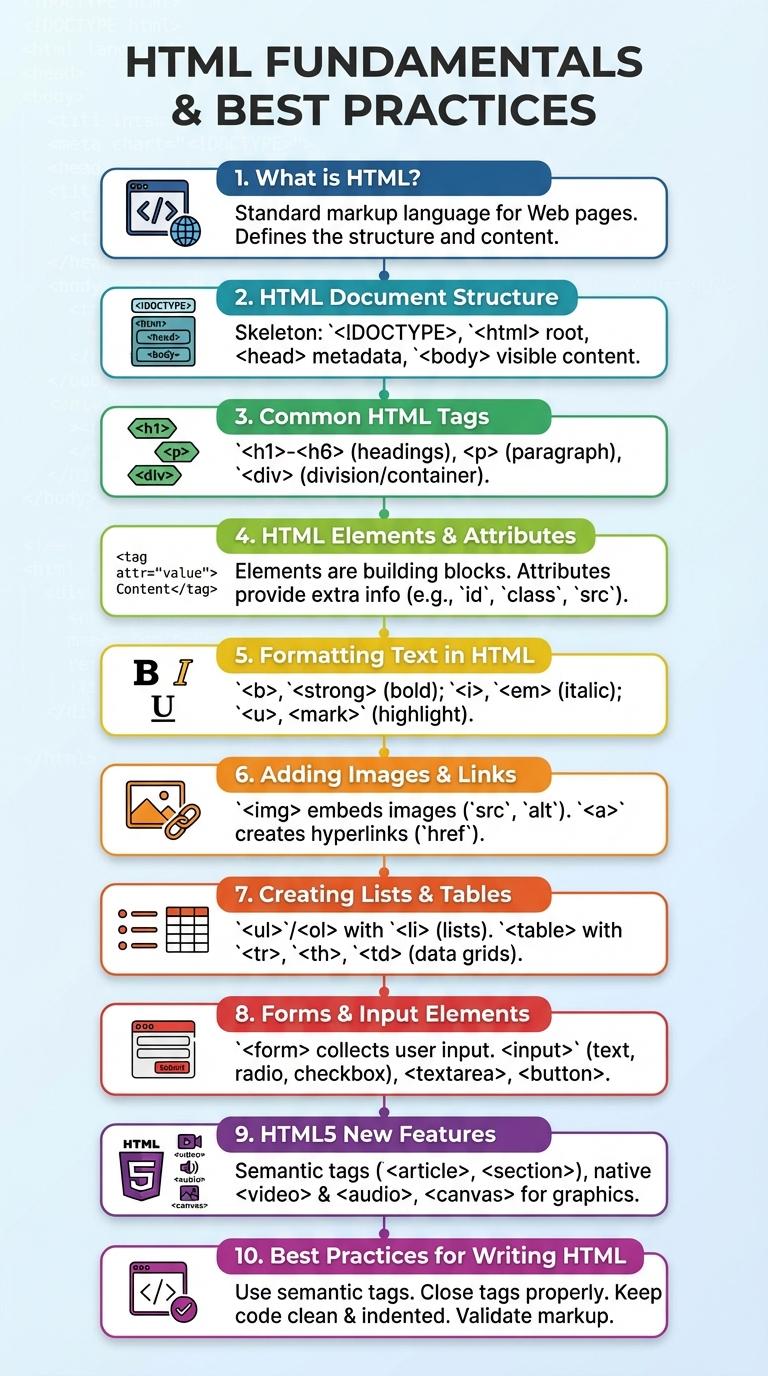
Image: Infographic About Html
HTML is the backbone of web development, structuring content and enabling seamless interaction between users and websites. This infographic visually breaks down key HTML elements, tags, and attributes to simplify understanding and enhance learning. It serves as a valuable reference for both beginners and experienced developers aiming to improve their coding efficiency.
What is HTML?
HTML, or HyperText Markup Language, is the standard language used to create and design webpages. It structures the content on the internet by defining elements such as headings, paragraphs, links, and images.
- Markup Language - HTML uses tags to label and organize text and multimedia in a web document.
- Web Structure - It provides the basic skeleton for a webpage, defining how content is displayed and arranged.
- Browser Interpretation - Web browsers read HTML code to render webpages correctly for users.
HTML Document Structure
HTML documents begin with a declaration defining the document type as HTML. The core structure includes the ,
, and tags essential for organizing content and metadata.
The
section contains elements like , <meta>, and <link> for SEO and styling references. The <body> houses all visible content including text, images, links, and interactive elements.</p>
<!-- [end p 1] -->
<h2>Common HTML Tags</h2>
<p>HTML uses various tags to structure and present content on the web. Understanding common HTML tags is essential for creating well-formed web pages.</p>
<ul>
<li><strong><h1> to <h6></strong> - Define headings, with <h1> as the highest level and <h6> as the lowest.</li>
<li><strong><p></strong> - Represents a paragraph of text, used to group sentences together.</li>
<li><strong><a></strong> - Creates hyperlinks that connect to other web pages or resources.</li>
<li><strong><img></strong> - Embeds images into the HTML document and includes attributes like src and alt.</li>
<li><strong><ul> and <li></strong> - Create unordered lists and list items for organizing content in bullet points.</li>
</ul>
<!-- [end p 2] -->
<h2>HTML Elements & Attributes</h2>
<p>HTML (HyperText Markup Language) structures web content using elements and attributes. Elements define content types, while attributes provide additional information or modify element behavior.<p>
<p>HTML elements consist of opening and closing tags surrounding content, such as <code><p></code> for paragraphs or <code><a></code> for links. Attributes like <code>href</code> or <code>class</code> are added inside the opening tag to customize elements, for example, <code><a href="url"></code>. Proper use of elements and attributes ensures semantic clarity and improves accessibility and SEO.<p>
<!-- [end p 3] -->
<h2>Formatting Text in HTML</h2>
<p>What are the key tags for formatting text in HTML? HTML uses tags like <strong> for bold text, <em> for italicized text, and <u> for underlined text. These tags help emphasize important content and improve readability.</p>
<p>How can you create lists to organize text in HTML? Use the <ul> tag for unordered lists with bullet points and the <ol> tag for ordered lists with numbers. List items within these tags are defined using the <li> element.</p>
<p>Which tag is used to change the appearance of text color and size? The <span> tag along with the style attribute allows customization of text color, font size, and other CSS properties. This makes it possible to highlight specific words or phrases.</p>
<p>How do HTML headings contribute to text formatting? Headings from <h1> to <h6> organize content hierarchically, with <h1> being the most important. Proper use of headings enhances the structure and accessibility of a webpage.</p>
<p>What role do line breaks and paragraphs play in HTML text formatting? The <br> tag inserts a single line break, while the <p> tag defines paragraphs to separate blocks of text. These ensure content is neatly spaced and easy to read.</p>
<!-- [end p 4] -->
<h2>Adding Images & Links</h2>
<p>HTML allows you to enhance web pages by adding images and hyperlinks effectively. These elements improve user engagement and navigation across websites.<p>
<ul>
<li><strong>Adding Images</strong> - Use the <code><img></code> tag with the <code>src</code> attribute to embed images from local files or URLs.</li>
<li><strong>Image Attributes</strong> - Include <code>alt</code> text for accessibility and <code>width</code> and <code>height</code> to control image dimensions.</li>
<li><strong>Creating Links</strong> - The <code><a></code> tag with the <code>href</code> attribute defines clickable links that direct users to other pages or resources.</li>
</ul>
<p>Mastering images and links in HTML is fundamental for building interactive and visually appealing websites.<p>
<!-- [end p 5] -->
<h2>Creating Lists & Tables</h2>
<p>HTML allows for the creation of ordered and unordered lists using the <ul>, <ol>, and <li> tags, providing a clear structure for presenting items. These lists help organize content in a user-friendly way, enhancing readability and user experience.</p>
<p>Tables in HTML are created with the <table>, <tr>, <th>, and <td> tags, enabling the display of data in rows and columns. Proper use of table elements ensures accessible, well-structured data presentation for websites and applications.</p>
<!-- [end p 6] -->
<h2>Forms & Input Elements</h2>
<p>HTML forms enable user interaction by collecting input through various elements like text fields, checkboxes, radio buttons, and dropdown menus. Input elements include types such as text, password, email, number, and date, each designed to capture specific data formats efficiently. Proper use of form attributes and validation enhances user experience and ensures accurate data submission.</p>
<!-- [end p 7] -->
<h2>HTML5 New Features</h2>
<table>
<tr>
<th>HTML5 New Feature</th>
<th>Description</th>
</tr>
<tr>
<td>Semantic Elements</td>
<td>Introduces elements like <article>, <section>, <nav>, and <header> for better content structure and accessibility.</td>
</tr>
<tr>
<td>Multimedia Support</td>
<td>Native support for audio and video using <audio> and <video> tags without third-party plugins.</td>
</tr>
<tr>
<td>Canvas Element</td>
<td>Enables dynamic, scriptable rendering of 2D shapes and bitmap images directly in the browser.</td>
</tr>
<tr>
<td>Form Enhancements</td>
<td>New input types like email, date, and range improve form validation and user experience.</td>
</tr>
<tr>
<td>Local Storage</td>
<td>Provides a way to store data locally within the user's browser for offline access and improved performance.</td>
</tr>
</table>
<!-- [end p 8] -->
</section>
<br/>
<hr class="mb30" />
<div class="meta mb30">
<div class="mb20"><quote><strong>About the author</strong>. </quote></div>
<hr class="mb30" />
<div><quote><strong>Disclaimer</strong>. <br/>The information provided in this document is for general informational purposes only and is not guaranteed to be complete. While we strive to ensure the accuracy of the content, we cannot guarantee that the details mentioned are up-to-date or applicable to all scenarios. Topics about infographic about html are subject to change from time to time.</quote></div>
</div>
<hr/>
</div>
<!-- End Main -->
</article>
<!-- Aside -->
<aside id="sidebar">
<div class="sb_author boxed">
<h3>Also in Technology</h3>
<div class="mb10"><a href="https://infograv.com/technology/citizenship-digital-infographic">Infographic: Understanding Digital Citizenship</a></div><div class="mb10"><a href="https://infograv.com/technology/blog-infographic">Infographic About Blogging</a></div><div class="mb10"><a href="https://infograv.com/technology/etech-infographic">Infographic on Educational Technology (EdTech)</a></div><div class="mb10"><a href="https://infograv.com/technology/he-infographic-tvl">Infographic: Understanding TVL (Total Value Locked) in DeFi</a></div><div class="mb10"><a href="https://infograv.com/technology/infographic-report-technical">Infographic: Key Elements of a Technical Report</a></div><div class="mb10"><a href="https://infograv.com/technology/gds-infographic">Infographic: An Overview of Global Distribution Systems (GDS)</a></div><div class="mb10"><a href="https://infograv.com/technology/era-infographic-it-living">Infographic: Life in the IT Era</a></div><div class="mb10"><a href="https://infograv.com/technology/computer-infographic-system-servicing">Infographic on Computer System Servicing</a></div><div class="mb10"><a href="https://infograv.com/technology/and-harassment-infographic-online-threats">Infographic: Understanding Online Threats and Harassment</a></div><div class="mb10"><a href="https://infograv.com/technology/classroom-infographic-ict-policies">Infographic: Essential ICT Classroom Policies</a></div>
<br/>
<hr/>
<h3>Category</h3>
<div class="boxy"><a href="https://infograv.com/religion">Religion</a></div>
<div class="boxy"><a href="https://infograv.com/environment">Environment</a></div>
<div class="boxy"><a href="https://infograv.com/health">Health</a></div>
<div class="boxy"><a href="https://infograv.com/science">Science</a></div>
<div class="boxy"><a href="https://infograv.com/art">Art</a></div>
<div class="boxy"><a href="https://infograv.com/general">General</a></div>
<div class="boxy"><a href="https://infograv.com/law">Law</a></div>
<div class="boxy"><a href="https://infograv.com/philosophy">Philosophy</a></div>
<div class="boxy"><a href="https://infograv.com/society">Society</a></div>
<div class="boxy"><a href="https://infograv.com/mathematics">Mathematics</a></div>
<div class="boxy"><a href="https://infograv.com/politics">Politics</a></div>
<div class="boxy"><a href="https://infograv.com/culture">Culture</a></div>
<div class="boxy"><a href="https://infograv.com/communication">Communication</a></div>
<div class="boxy"><a href="https://infograv.com/history">History</a></div>
<div class="boxy"><a href="https://infograv.com/technology">Technology</a></div>
<div class="boxy"><a href="https://infograv.com/energy">Energy</a></div>
</div>
</aside>
<!-- End Aside -->
</div>
<!-- End Row -->
<!-- Comment -->
<div id="comment" class="mt20">
<h3>Comments</h3>
<p>No comment yet</p>
</div>
<!-- End Comment -->
</div>
</div>
<footer id="footer">
<div class="wrapper"><div class="wrapperin">
<div id="footerin" class="row">
<div>© 2026 infograv.com - All rights reserved.</div>
<div class="tar">
<span class="ml20"><a href="https://infograv.com/page/about">About Us</a></span>
<span class="ml20"><a href="https://infograv.com/page/contact">Contact</a></span>
<span class="ml20"><a href="https://infograv.com/page/privacy">Privacy</a></span>
<span class="ml20"><a href="#header">Back to top</a></span>
</div>
</div>
</div></div>
</footer>
<!-- Default Statcounter code for infograv.com
https://infograv.com -->
<script type="text/javascript">
var sc_project=13188101;
var sc_invisible=1;
var sc_security="d9423ba5";
var sc_remove_link=1;
</script>
<script type="text/javascript"
src="https://www.statcounter.com/counter/counter.js"
async></script>
<noscript><div class="statcounter"><img class="statcounter"
src="https://c.statcounter.com/13188101/0/d9423ba5/1/"
alt="real time web analytics"
referrerPolicy="no-referrer-when-downgrade"></div></noscript>
<!-- End of Statcounter Code -->
</body>
</html>
