
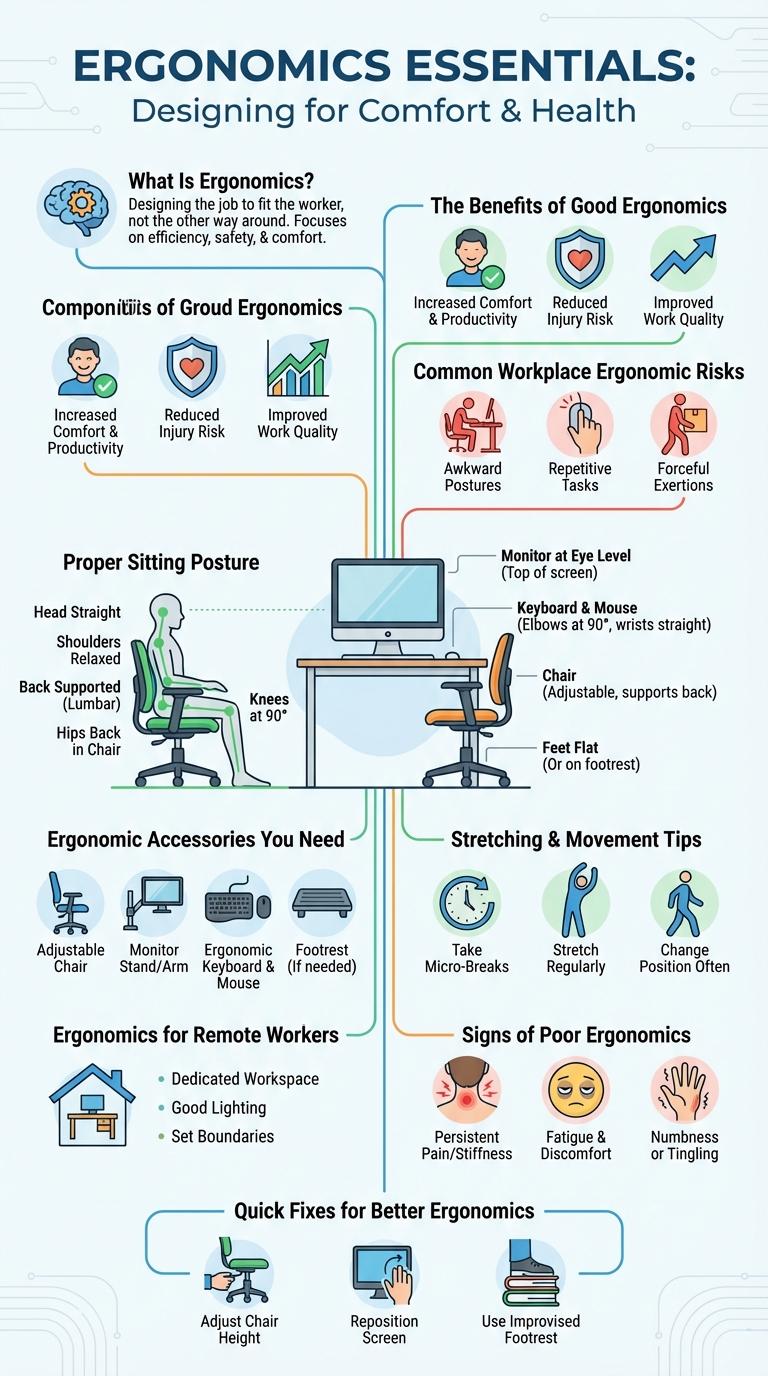
Ergonomics focuses on designing workspaces that enhance comfort, efficiency, and safety by aligning with human body mechanics. Understanding key ergonomic principles helps reduce the risk of musculoskeletal disorders and boosts productivity. This infographic highlights essential tips and strategies for creating an ergonomic environment at home or in the office.
What Is Ergonomics?
Ergonomics is the scientific study of designing workspaces and tools to fit the user's needs, promoting comfort and efficiency. It aims to reduce strain, fatigue, and injury by optimizing human interaction with environments and equipment.
Ergonomics encompasses physical, cognitive, and organizational aspects to enhance productivity and well-being. Proper ergonomic design can prevent musculoskeletal disorders and improve overall workplace safety. Understanding ergonomics helps create adaptable solutions for diverse users and tasks.
The Benefits of Good Ergonomics
Good ergonomics enhances comfort and reduces the risk of musculoskeletal disorders. It promotes proper posture and minimizes strain during daily activities.
Implementing ergonomic solutions boosts productivity and decreases workplace injuries. This leads to improved overall well-being and job satisfaction.
Common Workplace Ergonomic Risks
Ergonomics in the workplace aims to design tasks and environments that fit the worker's needs, reducing the risk of injury. Common ergonomic risks include repetitive motions, awkward postures, and prolonged static positions.
Workstations that are improperly set up can cause musculoskeletal disorders such as carpal tunnel syndrome or tendonitis. Identifying and addressing these risks improves comfort, productivity, and employee well-being.
Setting Up Your Workstation
Proper ergonomics at your workstation enhances comfort and reduces the risk of injury. Optimal setup involves careful adjustment of furniture and equipment to promote natural posture.
- Chair Height - Adjust the chair so feet rest flat on the floor and knees are at a 90-degree angle to prevent strain.
- Monitor Position - Place the monitor at eye level, about an arm's length away, to reduce neck and eye strain.
- Keyboard and Mouse - Position these tools at elbow height with wrists straight to minimize repetitive strain injuries.
Proper Sitting Posture
Ergonomics focuses on designing workspaces that support proper sitting posture to reduce strain and enhance comfort. Key elements include keeping the back straight, shoulders relaxed, and feet flat on the floor or supported by a footrest. Maintaining these postural habits helps prevent musculoskeletal disorders and improves productivity.
Ergonomic Accessories You Need
| Ergonomic Accessory | Benefits |
|---|---|
| Adjustable Chair | Supports proper posture, reduces back pain, and improves comfort during long sitting hours. |
| Ergonomic Keyboard | Minimizes strain on wrists and fingers, helps prevent repetitive strain injuries like carpal tunnel syndrome. |
| Mouse with Wrist Support | Promotes natural hand positioning, reduces wrist tension, and decreases risk of strain and injury. |
| Footrest | Improves circulation, supports lower back, and encourages better sitting posture. |
| Monitor Stand | Aligns screen at eye level, reduces neck and eye strain, promotes ergonomic viewing. |
Stretching & Movement Tips
Ergonomics plays a crucial role in preventing workplace injuries by promoting proper posture and movement. Incorporating stretching and movement breaks enhances physical well-being and productivity.
- Neck Stretches - Gently tilt your head side to side to relieve neck tension and improve blood flow.
- Shoulder Rolls - Roll shoulders backward and forward in a circular motion to reduce stiffness and muscle fatigue.
- Wrist Flexes - Extend your arm and bend the wrist up and down to prevent strain from repetitive tasks.
- Seated Spinal Twist - Rotate your upper body while seated to increase spinal mobility and reduce lower back discomfort.
- Standing Leg Extensions - Lift each leg alternately while standing to stimulate circulation and strengthen lower limbs.
Regularly practicing these stretching and movement tips supports ergonomic health and minimizes the risk of musculoskeletal disorders.
Ergonomics for Remote Workers
How can remote workers improve their ergonomic setup? Proper ergonomics reduce strain and increase productivity for those working from home. Adjusting chair height and monitor placement prevents long-term health issues.
What are key ergonomic tips for remote workers? Use an adjustable chair with lumbar support and position your screen at eye level. Keep feet flat on the ground and maintain wrists in a neutral position while typing.
Why is ergonomic lighting important for home offices? Good lighting reduces eye strain and headaches during extended work hours. Natural light combined with adjustable task lighting enhances comfort and focus.
How does ergonomic equipment benefit remote work efficiency? Ergonomic keyboards and mice minimize repetitive strain injuries and improve typing speed. Choosing the right tools supports long-term physical health and sustains work endurance.
What role does regular movement play in ergonomic health? Taking breaks to stretch or walk prevents muscle stiffness and improves circulation. Incorporating microbreaks enhances overall well-being and productivity when working remotely.
Signs of Poor Ergonomics
Poor ergonomics in the workplace often lead to physical discomfort such as neck pain, back strain, and wrist injuries. Signs include frequent headaches, muscle fatigue, and reduced productivity due to discomfort. Identifying these symptoms early helps prevent long-term health issues and enhances overall well-being.